Apple MapKit JS

Map Different.
Seb Duggan // CFCamp 2024
About me
- Building websites since 1994
- ...as a job since 1997
- CFML developer since 2000 (CF4.5)
- 12 years freelance full-stack developer
- 4 years with AutoTrader
- Lead Product Developer at Pixl8 since 2016
- Keen cricketer
- Serial re-homer of rescue dogs
Some history
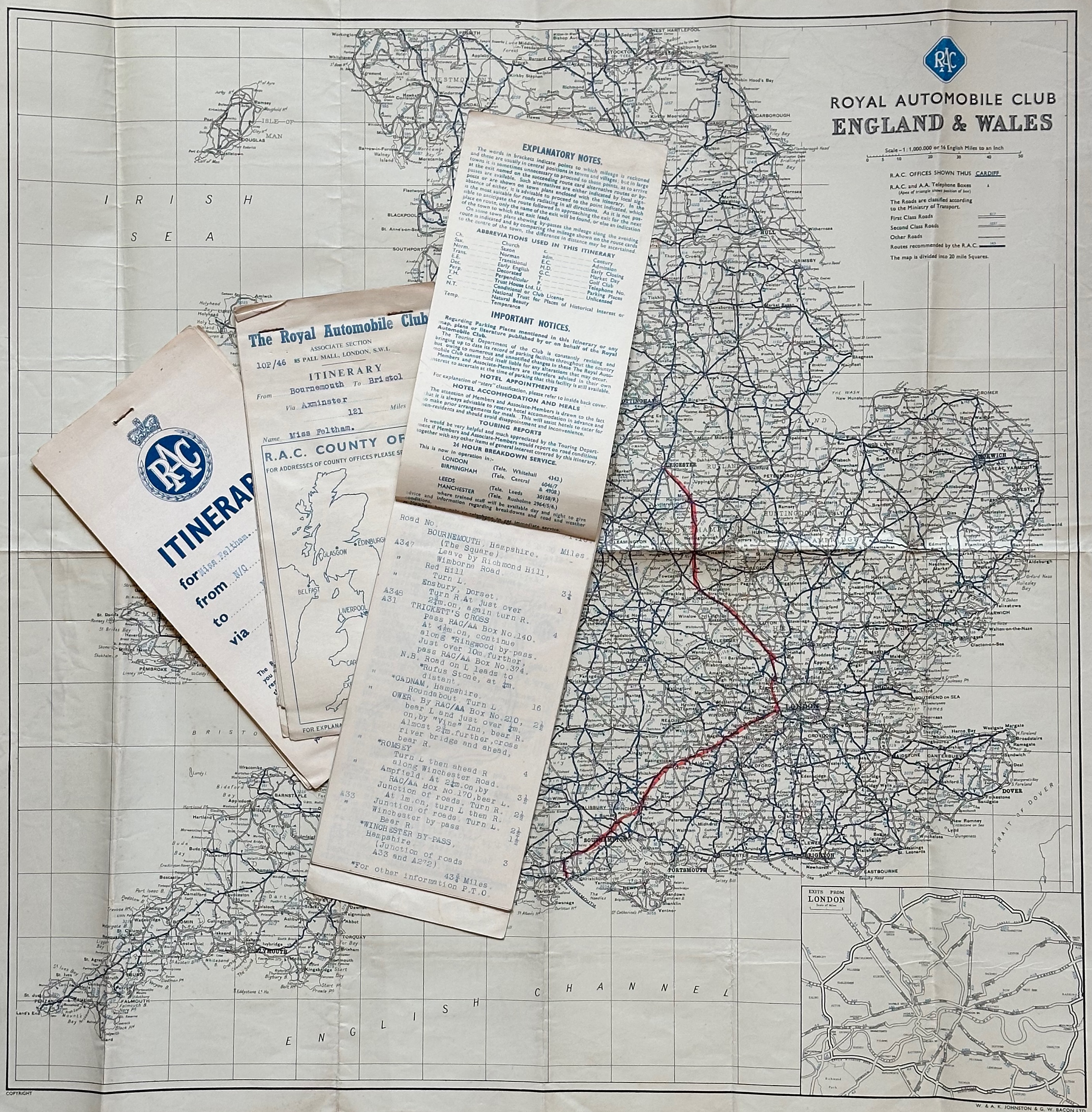
Before smartphones
Before online maps
Before sat nav
Before home computers
We had...
- 2005: Google Maps launches
- 2007: iPhone launches with Google Maps
- 2010: MapBox launches
- 2012: Apple Maps launches on the iPhone
- 9 days later: Tim Cook makes public apology
- Apple Maps improves over the following years
- 2018: MapKit JS launches on the web...
An unscientific survey
(of the Working Code podcast Discord channel)
Never used maps on a website
2
Google Maps
9
Something else (e.g. MapBox)
3
Apple MapKit JS
0
Why change?
-
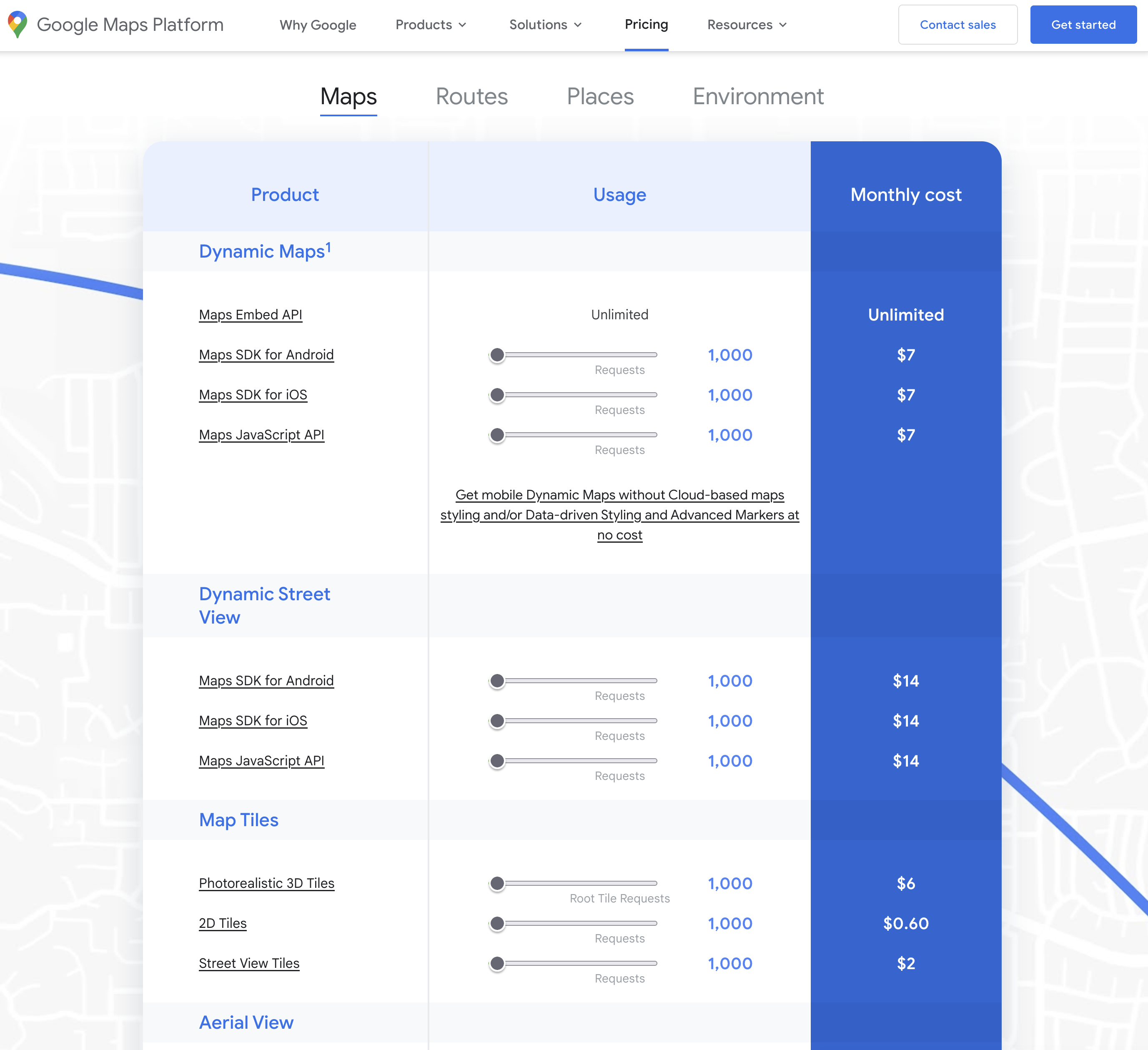
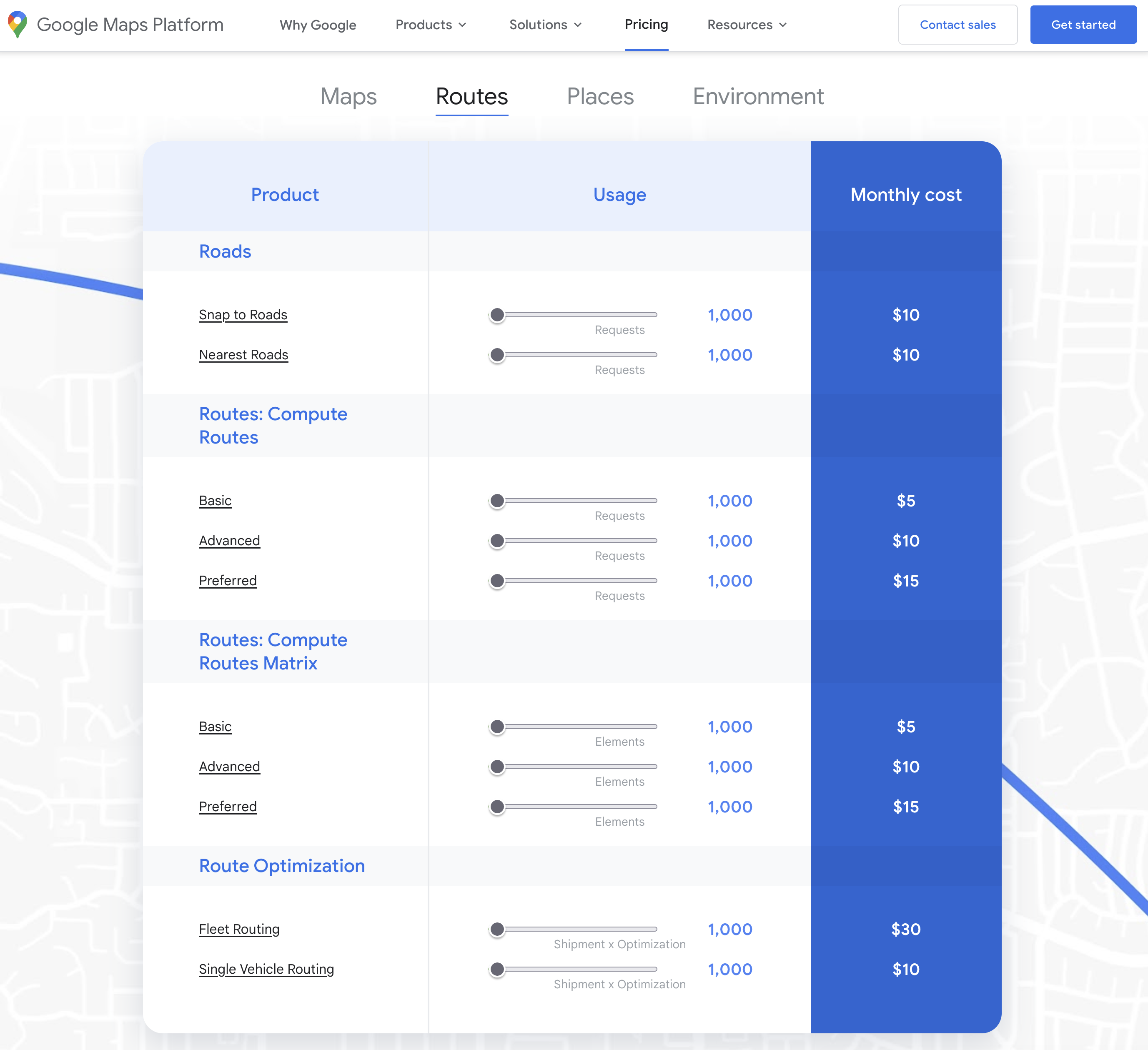
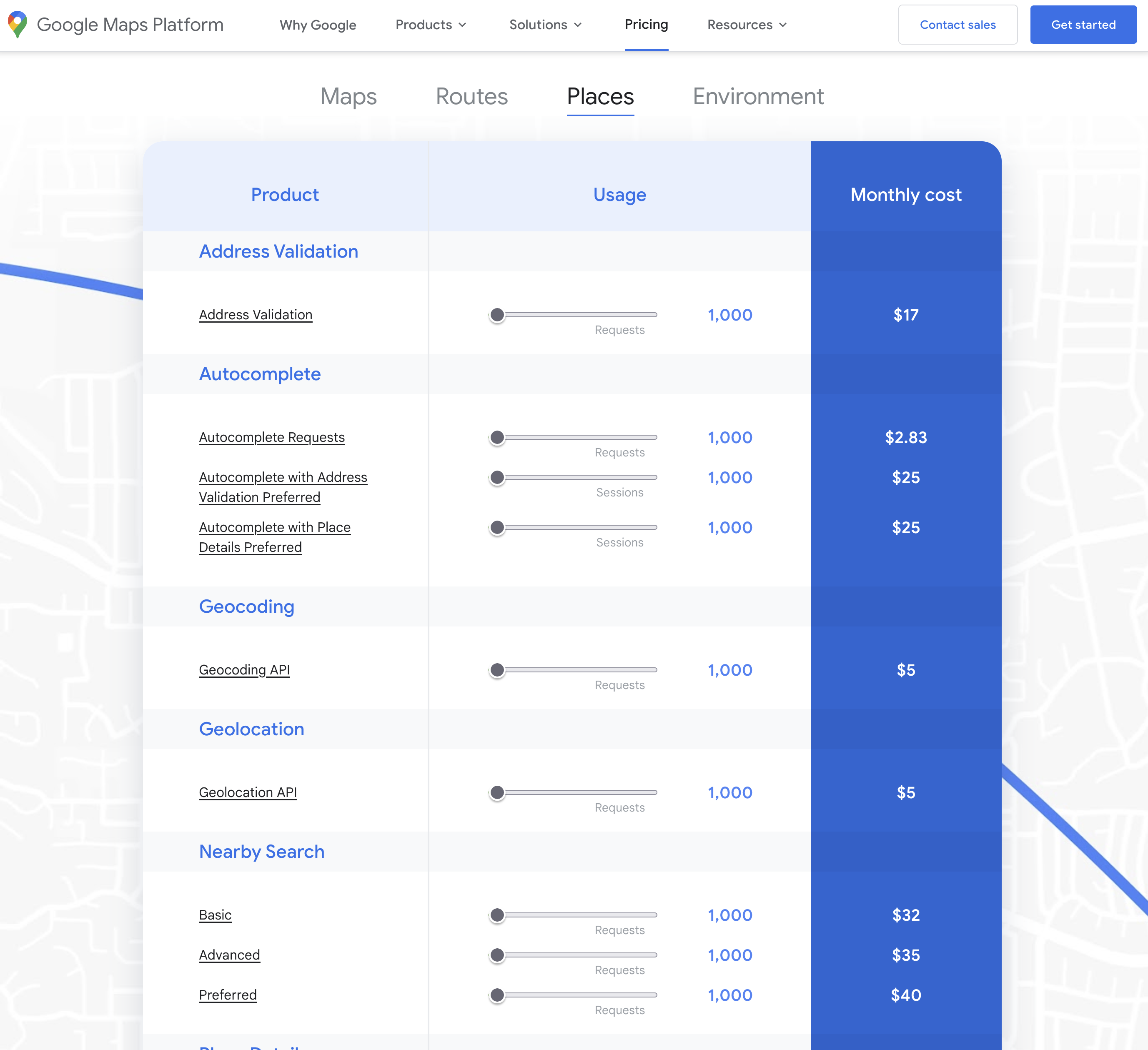
Pricing
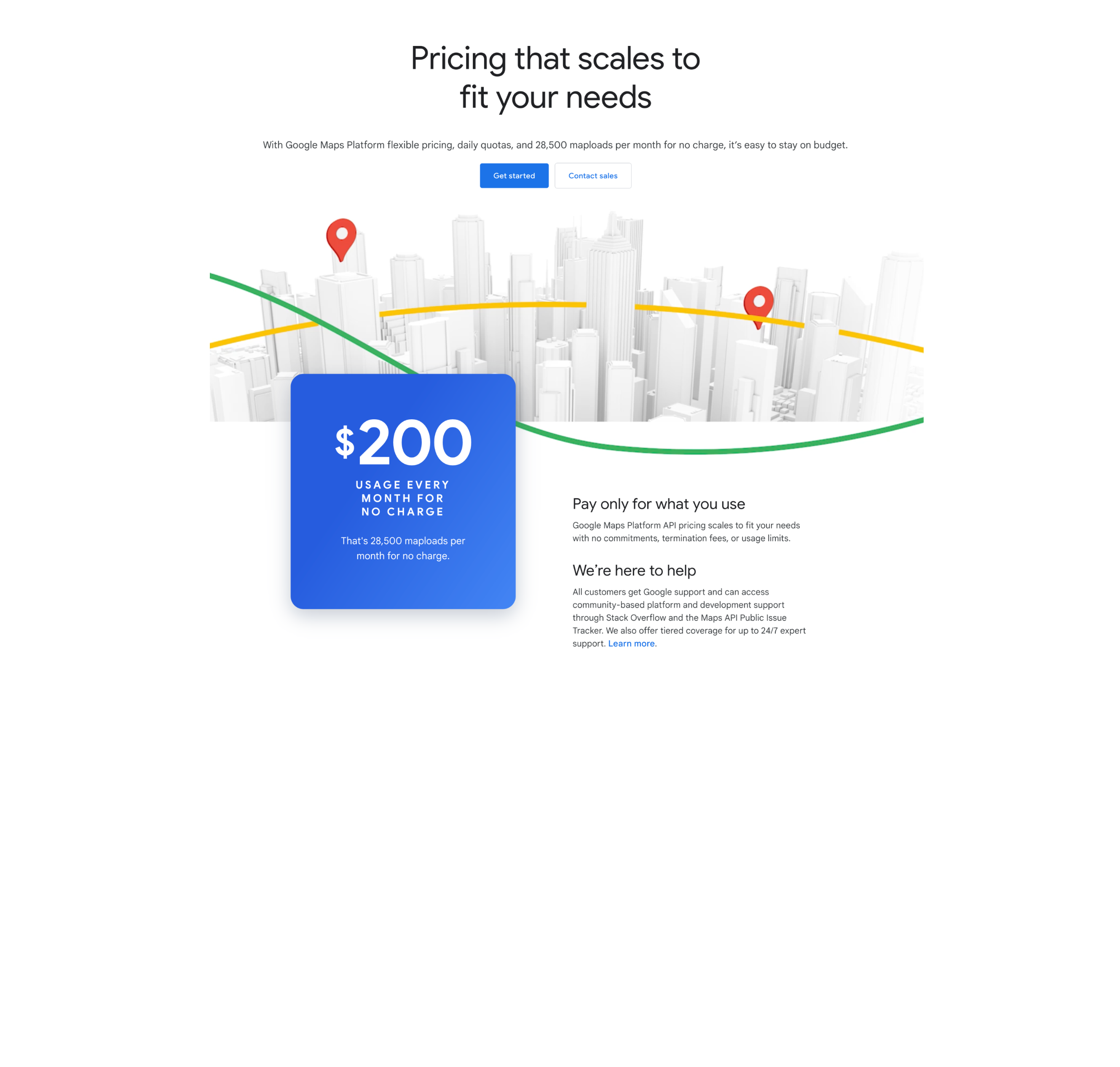
More transparent fee structure than Google Maps -
Privacy
Cookie and tracker free (used by DuckDuckGo) -
Consistency
API mirrors that of MapKit as far as possible -
Built-in goodness
Everyday tasks made easy
Fresh look
Cost of Google Maps
Cost of Apple MapKit JS
Apple Developer Program
$99 / €99 / £79 per year
- MapKit and MapKit JS
- WeatherKit API
- Beta releases
- App publishing and distribution
- ...and much more
MapKit usage limits
The Developer Program gives you:
- 250,000 map views
- 25,000 service calls
- 25,000 snapshot requests
- Spread across multiple sites
...not monthly, but daily!
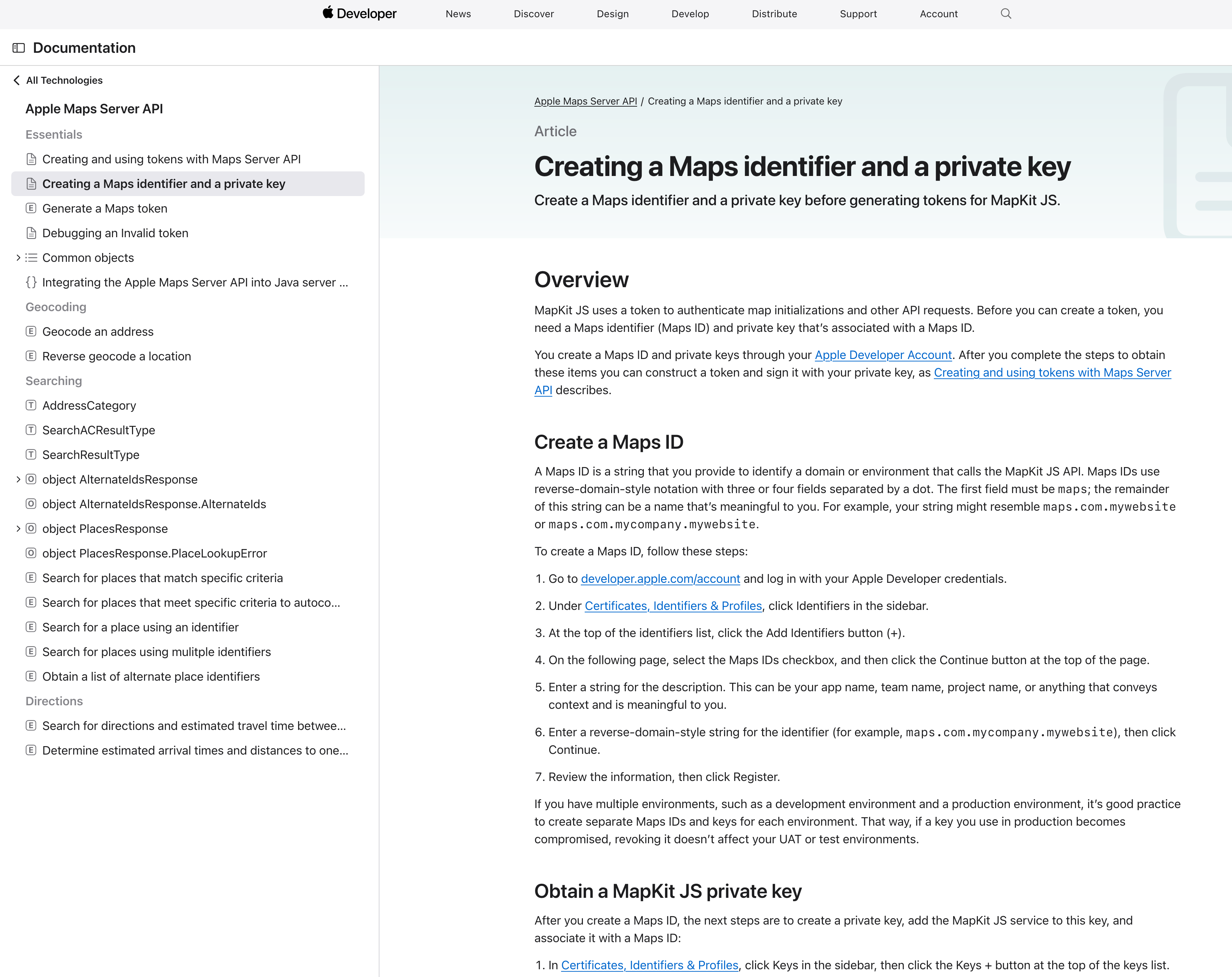
Getting started
The old way (up until 2 days ago):
- Create a Maps ID
- Generate MapKit JS private key
-
Use these, together with your Team (account) ID
to generate an expiring JWT
(requires code in your application)
Getting started
The new way
- Generate a token for the service you want
- ...that’s it!
Place ID - NEW!
- Place ID is a unique, unchanging reference to a feature on the map
- Search for places using the API, or use the interactive tool
- Store Place IDs in your database as an unchanging reference to a Place
- Use MapKit’s built-in functionality to display rich information about a Place
Create an embeddable map
Coding more complex maps
							<div id="map"></div>

							<script src="https://cdn.apple-mapkit.com/mk/5.x.x/mapkit.js"></script>
							<script>
								mapkit.init( {
									authorizationCallback: function( done ) {
										var xhr = new XMLHttpRequest();
										xhr.open( "GET", urlToReturnJWT );
										xhr.addEventListener( "load", function(){
											done( this.responseText );
										} );
										xhr.send();
									}
								} );
								// or...
								mapkit.init( {
									authorizationCallback: function( done ) {
										done( jwt );
									}
								} );

								const map = new mapkit.Map( "map" );

								map.region = new mapkit.CoordinateRegion(
									new mapkit.Coordinate( 50.941799, -1.07179 ),
									new mapkit.CoordinateSpan( 0.35, 0.35 )
								);
							</script>
Add an annotation
							const map    = new mapkit.Map( "map" );
							const center = new mapkit.Coordinate( 50.9417, -1.0717 );

							map.region = new mapkit.CoordinateRegion(
								center,
								new mapkit.CoordinateSpan( 0.1, 0.1 )
							);

							const marker = new mapkit.MarkerAnnotation( center );

							map.addAnnotation( marker );
Customise an annotation
							const map    = new mapkit.Map( "map" );
							const center = new mapkit.Coordinate( 50.9417, -1.0717 );

							map.region = new mapkit.CoordinateRegion(
								center,
								new mapkit.CoordinateSpan( 0.05, 0.05 )
							);

							const markers = [];
							markers.push( new mapkit.MarkerAnnotation( center, {
								color     : "#fff",
								title     : "Hambledon Cricket Club",
								subtitle  : "The cradle of cricket",
								glyphText : "🏏",
								selected  : true
							} ) );

							map.addAnnotations( markers );
Custom callouts
							const map    = new mapkit.Map( "map" );
							const center = new mapkit.Coordinate( 50.9417, -1.0717 );

							map.region   = new mapkit.CoordinateRegion(
								center,
								new mapkit.CoordinateSpan( 0.05, 0.05 )
							);

							const annotationCallout = {
								calloutLeftAccessoryForAnnotation: function( annotation ) {
									const left     = document.createElement( "div" );
									left.className = "left-accessory-view";

									const leftIcon       = document.createElement( "span" );
									leftIcon.textContent = "\u{26C5}"; // Sun & Clouds
									left.appendChild( leftIcon );

									const leftText       = document.createElement( "div" );
									leftText.textContent = "22\u{00b0}C";
									left.appendChild( leftText );

									return left;
								},
								calloutRightAccessoryForAnnotation: function( annotation ) {
									const right       = document.createElement( "a" );
									right.className   = "right-accessory-view";
									right.href        = annotation.data.url;
									right.target      = "_blank";
									right.textContent = "\u{24D8}"; // (i) icon

									return right;
								}
							};

							const marker = new mapkit.MarkerAnnotation( center, {
								callout   : annotationCallout,
								color     : "#fff",
								title     : "Hambledon Cricket Club",
								subtitle  : "The cradle of cricket",
								glyphText : "🏏",
								data      : { url:"https://hambledon.cc" }
							} );

							map.addAnnotation( marker );
Handling map events
Map display events
- region-change-start
- region-change-end
- rotation-start
- rotation-end
- scroll-start
- scroll-end
- zoom-start
- zoom-end
- map-type-change
Annotation/overlay events
- select
- deselect
- drag-start
- dragging
- drag-end
Drag a marker
							const map    = new mapkit.Map( "map" );
							const center = new mapkit.Coordinate( 50.9417, -1.0717 );
							const marker = new mapkit.MarkerAnnotation( center, {
								draggable : true,
								selected  : true,
								title     : "DRAG ME!"
							} );

							map.region = new mapkit.CoordinateRegion(
								center,
								new mapkit.CoordinateSpan( 0.1, 0.1 )
							);

							marker.addEventListener( "drag-start", function( event ) {
								event.target.title = "";
							} );
							marker.addEventListener( "dragging", function( event ) {
								document.querySelector( "#lat" ).textContent =
									event.coordinate.latitude;
								document.querySelector( "#lng" ).textContent =
									event.coordinate.longitude;
							} );
							marker.addEventListener( "drag-end", function( event ) {
								map.setCenterAnimated( event.target.coordinate );
							} );

							map.addAnnotation( marker );
Interaction with the web page
							<mapkit-map tokenurl="https://hambledon.cc/mapkit/getToken/">
								<div class="map-locations">

									<address id="venue-C627B282-47B7-4740-9937E8D177EA0DE2"
											class="map-location content-widget"
											data-lat="50.941799"
											data-lng="-1.07179"
											data-glyph-text="🏏"
											data-color="#49678b"
											data-title="Ridge Meadow"
											data-subtitle="">
										<h2>Ridge Meadow</h2>
										<p>
											<span property="address" vocab="http://schema.org/" typeof="PostalAddress">
												<span property="streetAddress">Brook Lane<br>Hambledon</span><br>
												<span property="addressLocality">Waterlooville</span><br>
												<span property="addressRegion">Hampshire</span>
												<span property="postalCode">PO7 4TH</span>
												<meta property="addressCountry" content="UK">
											</span>
										</p>
									</address>

									<address id="venue-B6E2FB5B-3423-4E01-8FB5AE8C615D48A3"
											class="map-location content-widget"
											data-lat="50.946201"
											data-lng="-1.03826"
											data-glyph-text="🏏"
											data-color="#49678b"
											data-title="Broadhalfpenny Down"
											data-subtitle="">
										<h2>Broadhalfpenny Down</h2>
										<p>
											<span property="address" vocab="http://schema.org/" typeof="PostalAddress">
												<span property="streetAddress">Hyden Farm Lane<br>Clanfield</span><br>
												<span property="addressLocality">Waterlooville</span><br>
												<span property="addressRegion">Hampshire</span>
												<span property="postalCode">PO8 0UB</span>
												<meta property="addressCountry" content="UK">
											</span>
										</p>
									</address>

								</div>
							</mapkit-map>
Map added via Web Component
							class MapkitMap extends HTMLElement {
								constructor () {
									super();

									this.annotations = [];
									this.latDelta    = 0;
									this.lngDelta    = 0;
									this.center      = null;
								}

								connectedCallback() {
									const tokenUrl   = this.getAttribute( "tokenurl" );
									const addressEls = this.querySelectorAll( ".map-location" );

									mapkit.init( {
										authorizationCallback : function( done ) {
											fetch( tokenUrl )
												.then( res => res.text() )
												.then( done );
										}
									} );

									addressEls.forEach( function( addressEl, i ) {
										const lat   = parseFloat( addressEl.getAttribute( "data-lat" ) ),
											lng       = parseFloat( addressEl.getAttribute( "data-lng" ) ),
											color     = addressEl.getAttribute( "data-color" ),
											title     = addressEl.getAttribute( "data-title" ),
											glyphText = addressEl.getAttribute( "data-glyph-text" ),
											subtitle  = addressEl.getAttribute( "data-subtitle" ),
											coord     = new mapkit.Coordinate( lat, lng ),
											marker    = new mapkit.MarkerAnnotation( coord, {
												color     : color,
												title     : title,
												subtitle  : subtitle,
												glyphText : glyphText,
												selected  : i==0,
												data      : { element:addressEl }
											} );

										this.center = this.center || coord;
										this.setLatLngDelta( coord );
										this.annotations.push( marker );

										addressEl.addEventListener( "click", function( e ){
											if ( !map ) return;
											map.selectedAnnotation = marker;
										} );
									}, this );

									const map = new mapkit.Map( this.getMapDiv(), {
										region : new mapkit.CoordinateRegion(
											this.center,
											new mapkit.CoordinateSpan( this.lngDelta, this.latDelta )
										)
									} );

									map.addEventListener( "select", function( event ) {
										if ( !event.annotation ) return;
										map.setCenterAnimated( event.annotation.coordinate );
										event.annotation.data.element.classList.add( "selected-location" );
									} );
									map.addEventListener( "deselect", function( event ) {
										if ( !event.annotation ) return;
										event.annotation.data.element.classList.remove( "selected-location" );
									} );
									map.addAnnotations( this.annotations );
								}

								setLatLngDelta( coordinate ) {
									this.latDelta = Math.max( this.latDelta, Math.abs( this.center.latitude - coordinate.latitude ) );
									this.lngDelta = Math.max( this.lngDelta, Math.abs( this.center.longitude - coordinate.longitude ) );
								}
								getMapDiv() {
									let mapDivEl = this.querySelector( ".map-container" );
									if ( !mapDivEl ) {
										mapDivEl = document.createElement( "div" );
										mapDivEl.classList.add( "map-container" );
										this.append( mapDivEl );
									}
									return mapDivEl;
								}
							}

							customElements.define( "mapkit-map", MapkitMap );
GeoJSON
						{
							"type": "FeatureCollection",
							"features": [
								{
									"properties": {
										"title": "Barripper"
									},
									"type": "Feature",
									"geometry": {
										"coordinates": [
											-5.31378,
											50.1934
										],
										"type": "Point"
									}
								},
								{
									"properties": {
										"title": "Beacon"
									},
									"type": "Feature",
									"geometry": {
										"coordinates": [
											-5.287,
											50.206
										],
										"type": "Point"
									}
								},
								{ ... }
							]
						}
GeoJSON: basic display
							const map = new mapkit.Map( "map" );

							const geoJSONDelegate = {
								geoJSONDidComplete : function( itemCollection ) {
									map.showItems( itemCollection );
								},
								geoJSONDidError : function( err ) {
									console.error( err );
								}
							};

							mapkit.importGeoJSON( "./geojson.json", geoJSONDelegate );
GeoJSON: customise points
							const map = new mapkit.Map( "map" );

							const geoJSONDelegate = {
								itemForFeature : function( item, geoJSON ) {
									if ( geoJSON.geometry.type == "Point" ) {
										item.title     = geoJSON.properties.title;
										item.color     = geoJSON.properties.color     || "yellow";
										item.glyphText = geoJSON.properties.glyphText || "🏏";
										item.data      = geoJSON.properties;
									}
									return item;
								},
								geoJSONDidComplete : function( itemCollection ) {
									map.showItems( itemCollection );
								},
								geoJSONDidError : function( err ) {
									console.error( err );
								}
							};

							mapkit.importGeoJSON( "./geojson.json", geoJSONDelegate );
Clusters
							const map = new mapkit.Map( "map" );

							const geoJSONDelegate = {
								itemForFeature : function( item, geoJSON ) {
									if ( geoJSON.geometry.type == "Point" ) {
										item.title     = geoJSON.properties.title;
										item.color     = geoJSON.properties.color     || "yellow";
										item.glyphText = geoJSON.properties.glyphText || "🏏";
										item.data      = geoJSON.properties;
										item.clusteringIdentifier = "myCluster";
									}
									return item;
								},
								geoJSONDidComplete : function( itemCollection ) {
									map.showItems( itemCollection );
								},
								geoJSONDidError : function( err ) {
									console.error( err );
								}
							};

							mapkit.importGeoJSON( "./geojson.json", geoJSONDelegate );
Customise clusters
							const map = new mapkit.Map( "map" );

							const geoJSONDelegate = {
								itemForFeature : function( item, geoJSON ) {
									if ( geoJSON.geometry.type == "Point" ) {
										item.title     = geoJSON.properties.title;
										item.color     = geoJSON.properties.color     || "yellow";
										item.glyphText = geoJSON.properties.glyphText || "🏏";
										item.data      = geoJSON.properties;
										item.animates  = false;
										item.clusteringIdentifier = "myCluster";
									}
									return item;
								},
								geoJSONDidComplete : function( itemCollection ) {
									map.annotationForCluster = function( clusterAnnotation ) {
										clusterAnnotation.color    = "#009900";
										clusterAnnotation.title    =
											`${clusterAnnotation.memberAnnotations.length} clubs`;
										clusterAnnotation.subtitle = "";
									};
									map.showItems( itemCollection );
								},
								geoJSONDidError : function( err ) {
									console.error( err );
								}
							};

							mapkit.importGeoJSON( "./geojson.json", geoJSONDelegate );
API functionality
All available via MapKit JS or Server API
- Geocode
- Reverse Geocode
- Search
- Search Autocomplete
- Places
- Directions
- ETA
Directions API
							const map        = new mapkit.Map( "map" );
							const directions = new mapkit.Directions();

							map.region = new mapkit.CoordinateRegion(
								new mapkit.Coordinate( 48.1548813, 11.4594368 ),
								new mapkit.CoordinateSpan( 0.4, 0.4 )
							);

							directions.route( {
								origin        : "Munich Airport"
								destination   : "Marriott Hotel Freising",
								transportType : mapkit.Directions.Transport.Automobile,
							}, function( error, data ){
								const markers  = [];
								const polyline = data.routes[ 0 ].polyline;

								polyline.style = new mapkit.Style( {
									lineWidth     : 10,
									lineDash      : [ 20 ],
									strokeColor   : "red",
									strokeOpacity : 0.5
								} );

								markers.push( new mapkit.MarkerAnnotation(
									new mapkit.Coordinate(
										data.origin.coordinate.latitude,
										data.origin.coordinate.longitude
									),
									{
										title     : data.origin.name,
										glyphText : "1",
										color     : "green"
									}
								) );
								markers.push( new mapkit.MarkerAnnotation(
									new mapkit.Coordinate(
										data.destination.coordinate.latitude,
										data.destination.coordinate.longitude
									),
									{
										title     : data.destination.name,
										glyphText : "2"
									}
								) );

								map.showItems(
									[ polyline, markers ],
									{ animate: true }
								);
							} );
Using the Server APIs
1. Get an access token:
								GET https://maps-api.apple.com/v1/token

								Authorization: Bearer <your_jwt>
2. Use the token in your request:
								GET https://maps-api.apple.com/v1/search?q=Marriott%20Hotel%20Freising

								Authorization: Bearer <access_token>
Search API response
							{
								"displayMapRegion": {
									"southLatitude": 48.39831632561982,
									"westLongitude": 11.734098745509982,
									"northLatitude": 48.41000342275947,
									"eastLongitude": 11.751689510419965
								},
								"results": [
									{
										"coordinate": {
											"latitude": 48.4041566,
											"longitude": 11.7426789
										},
										"displayMapRegion": {
											"southLatitude": 48.3996683,
											"westLongitude": 11.7361283,
											"northLatitude": 48.4086515,
											"eastLongitude": 11.7496597
										},
										"name": "Munich Airport Marriott Hotel",
										"formattedAddressLines": [
											"Alois-Steinecker-Straße 20",
											"85354 Freising",
											"Germany"
										],
										"structuredAddress": {
											"administrativeArea": "Bavaria",
											"locality": "Freising",
											"postCode": "85354",
											"subLocality": "Freising",
											"thoroughfare": "Alois-Steinecker-Straße",
											"subThoroughfare": "20",
											"fullThoroughfare": "Alois-Steinecker-Straße 20",
											"dependentLocalities": [
												"Freising"
											]
										},
										"country": "Germany",
										"countryCode": "DE",
										"poiCategory": "Hotel"
									}
								]
							}
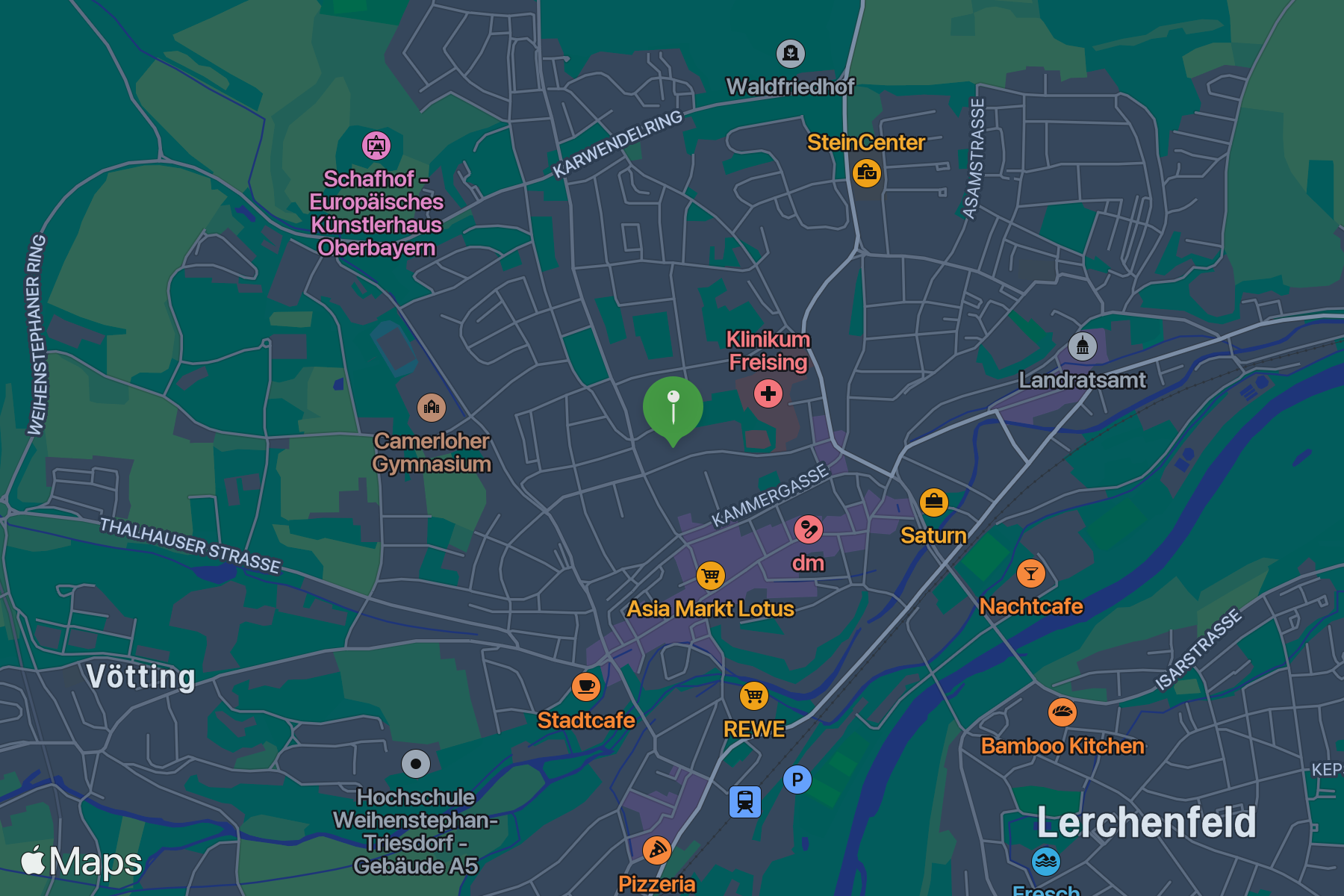
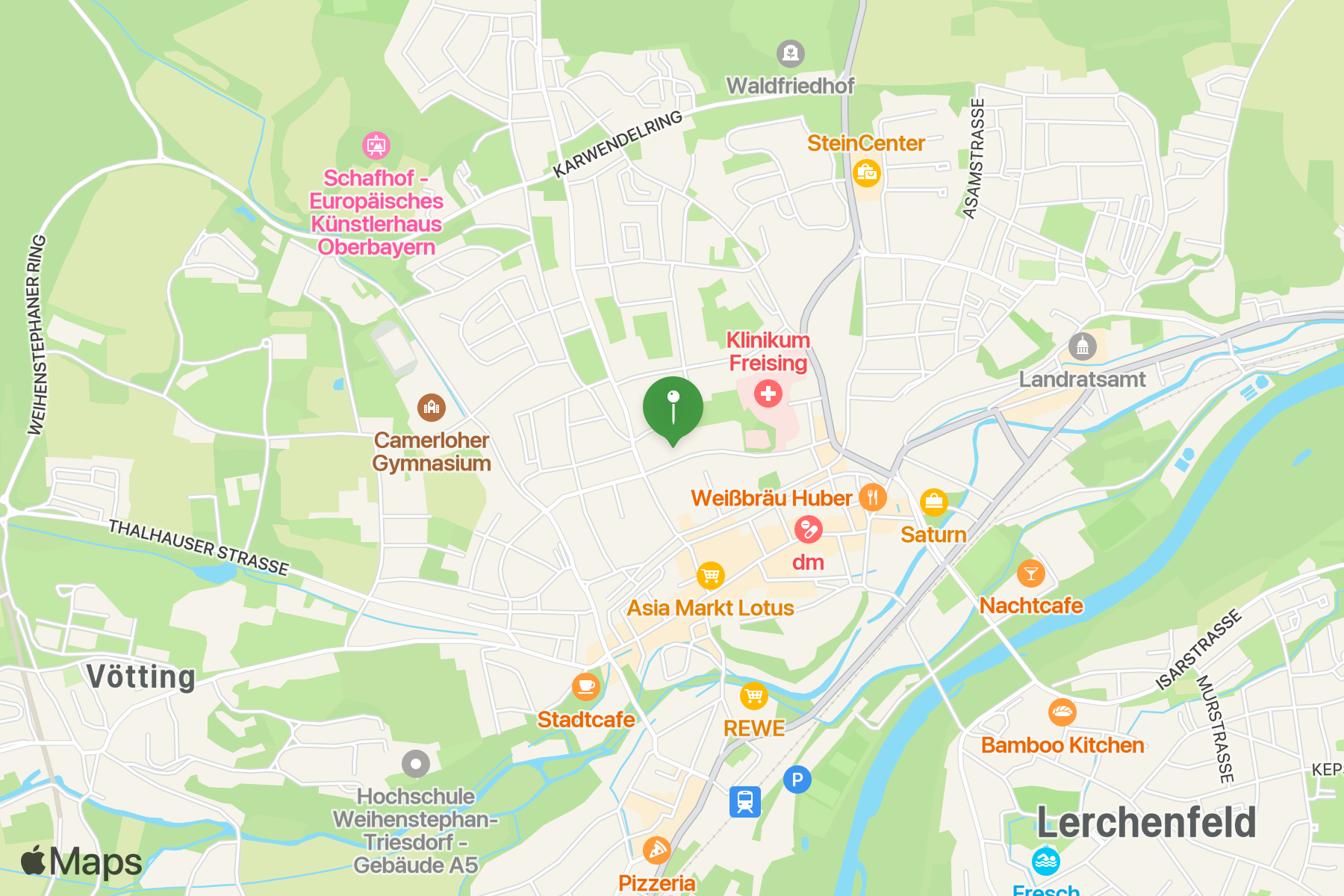
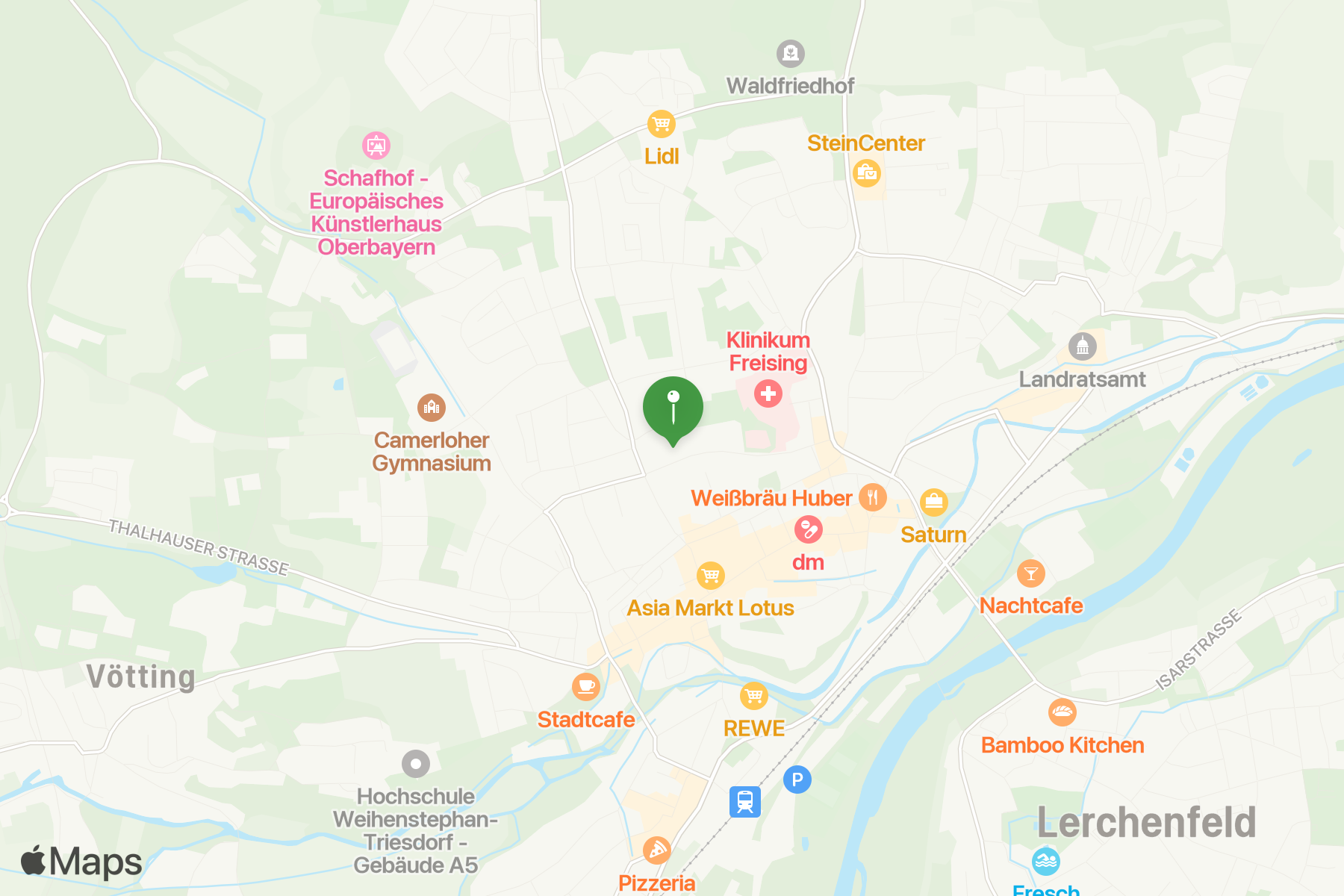
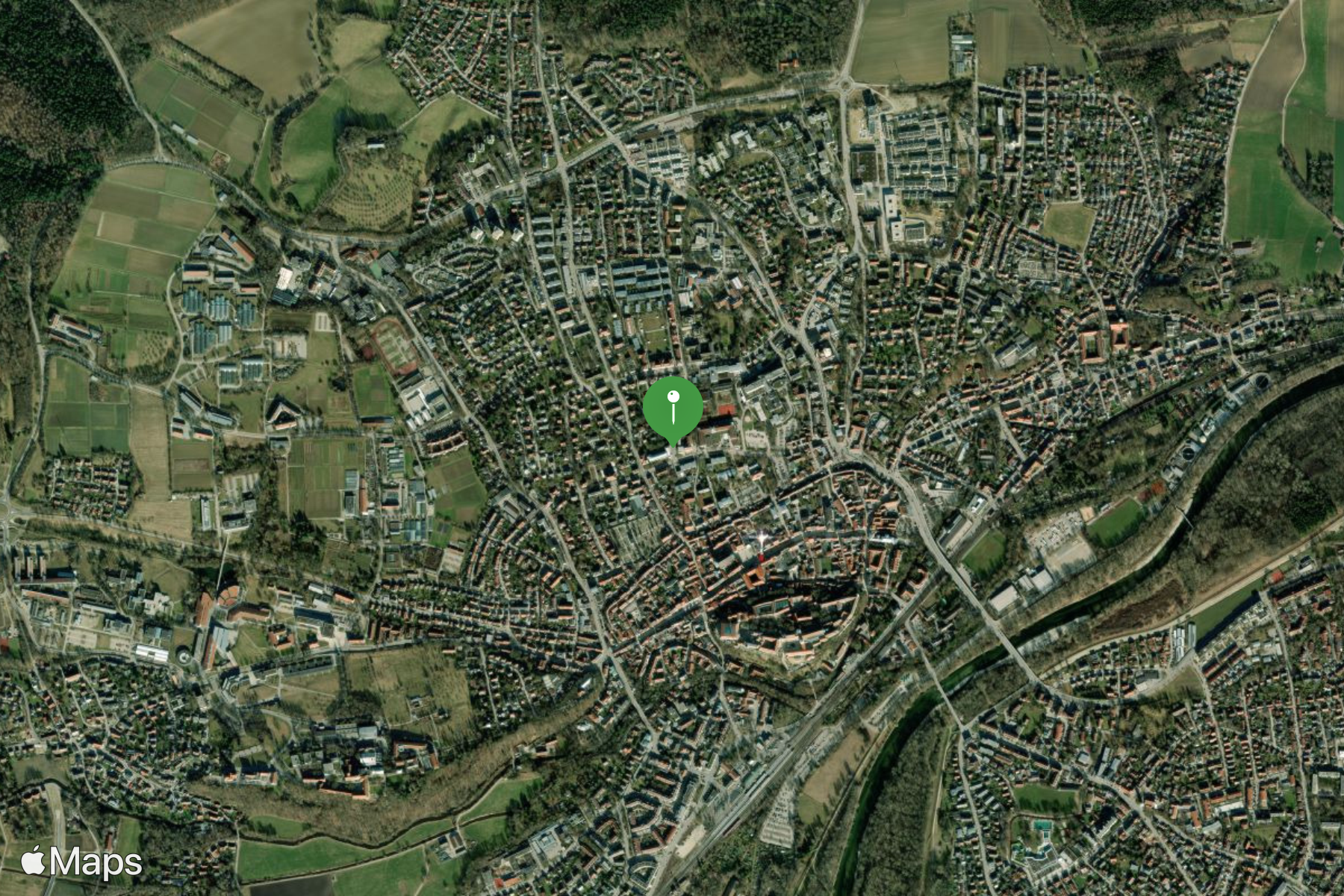
Snapshots API
- Generate a static map image
- Add markers, lines etc
- Max 600px x 600px
- ...but also set up to 3x pixel scale
							https://snapshot.apple-mapkit.com/api/v1/snapshot
								?center=48.4036796,11.7411341
								&annotations=[{"point":"48.4036796,11.7411341", "color":"449944"}]
								&z=14
								&colorScheme=dark
								&scale=3
								&width=600
								&height=600
								&token=eyJraWQiOiI3QjI2SzZZN.....
There is much more!
Check out the docs, examples and forums:
MapKit JS overview
https://developer.apple.com/maps/web/
MapKit resources
https://developer.apple.com/maps/resources/
Snapshot API reference
https://developer.apple.com/documentation/snapshots/
Contact me
Mastodon
https://mastodonapp.uk/@sebduggan
Email
[email protected]
Slide deck
https://cfcamp2024.sebduggan.uk